
 Electronics & Computer
 Smart Home & Security
 Home Appliances
 Kitchen & Dining
 Power & Charging
 Gaming & Entertainment
 Automotive & Outdoor
 Health & Personal Care
 Office Electronics
 Smart Lighting & Ambient
ACASIS Review: High-Speed SSD Enclosures, Thunderbolt Docks and USB-C Hubs
Modern laptops are becoming thinner, faster, and more portable, but that often means fewer built-in ports and limited internal storage expansion. For creators, photographers, video editors, business users, and anyone working with large files, external storage and connectivity have therefore become essential parts of a productive setup.
ACASIS focuses on solving exactly these problems. The brand offers a wide selection of high-speed M.2 NVMe SSD enclosures, Thunderbolt and USB4 storage solutions, docking stations, USB-C hubs, Mac mini accessories, and other connectivity products.
In this ACASIS review, we take a detailed look at the company’s product ecosystem, with particular attention to its 40Gbps NVMe SSD enclosures and multi-port docking stations. We will examine the practical benefits, performance-oriented features, compatibility considerations, and the types of users who may benefit most from ACASIS hardware.
Affiliate disclosure: This article contains affiliate links. If you purchase through one of these links, I may receive a commission at no additional cost to you.
What Is ACASIS?
ACASIS is a technology brand specializing in storage and computer connectivity solutions. Its catalog covers products ranging from compact external SSD enclosures to sophisticated desktop docking stations with numerous ports.
One of the most interesting aspects of the ACASIS lineup is its emphasis on high-speed external storage. Rather than simply offering basic USB drive cases, the company has developed multiple products around M.2 NVMe SSDs and high-bandwidth interfaces such as Thunderbolt and USB4.
This makes ACASIS particularly relevant for people who regularly transfer large files. Video editors working with high-resolution footage, photographers maintaining large RAW libraries, developers, designers, and users who need fast portable storage can all benefit from a properly configured NVMe enclosure.

ACASIS 40Gbps NVMe SSD Enclosures
High-speed SSD enclosures are one of the standout categories in the ACASIS product range. A particularly interesting example is the TBU405 series, which combines M.2 NVMe storage with bandwidth of up to 40Gbps.
The concept is straightforward: instead of purchasing a conventional pre-built portable SSD, you can install a compatible M.2 NVMe SSD inside the enclosure and create your own external storage solution.
This approach has several potential advantages. You can choose the SSD capacity and performance level that fits your requirements, replace the drive when your storage needs increase, and potentially reuse an NVMe SSD that you already own.
The ACASIS TBU405 is designed around a tool-free installation system. This is especially convenient for users who do not want to deal with tiny screws every time they install or replace an SSD. Open the enclosure, position the compatible NVMe drive correctly, secure it according to the supplied instructions, and close the housing.
ACASIS lists the TBU405 as compatible with Thunderbolt 4 and Thunderbolt 3 while also providing broader USB compatibility on the applicable model. However, interface compatibility differs between ACASIS enclosure variants, so checking the exact product specifications before ordering is important.
Why 40Gbps Connectivity Matters
Storage speed is increasingly important because modern creative files can be enormous. High-resolution video projects, RAW image libraries, virtual machines, development environments, and large backups can quickly expose the limitations of slower external drives.
A 40Gbps-class interface provides considerably more bandwidth than traditional USB connections. Actual SSD performance will depend on the installed drive, computer, interface, file type, thermal conditions, and other hardware factors, so the advertised interface bandwidth should not be confused with guaranteed real-world file-transfer speed.
Even with that distinction, a Thunderbolt or USB4 NVMe enclosure can be a valuable upgrade for users whose computers support the appropriate high-speed interface.
For a video editor, for example, faster external storage can make it easier to transfer large media libraries and work with project files. For photographers, it can reduce the time spent moving large collections between storage devices. For general users, it can make backups and large data transfers much less frustrating.

Portable Aluminum Design and Cooling
Performance is only part of what matters with an external NVMe enclosure. Heat management is also important because high-performance SSDs can become warm during sustained transfers.
ACASIS uses aluminum-based designs across several of its SSD enclosure products. The metal housing provides a sturdy exterior while also helping transfer heat away from internal components. Selected ACASIS products also incorporate additional cooling features, including finned designs or active cooling fans.
The compact format is another practical advantage. An NVMe enclosure can fit easily into a laptop bag, making it useful for people who work between home, an office, studios, hotels, or other locations.
For travelers and creators working in the field, that portability can be just as important as maximum benchmark performance. Carrying terabytes of storage in a device that takes up relatively little space is one of the biggest benefits of modern M.2 technology.
ACASIS Dual SSD and RAID Storage Options
Users who need substantially more storage can move beyond single-drive enclosures. ACASIS also offers a dual-bay M.2 NVMe enclosure compatible with Thunderbolt 4 and Thunderbolt 3.
The TBU405ProMax is particularly interesting for more advanced workflows. It contains two SSD slots, and ACASIS states that each slot can support up to 8TB, potentially providing up to 16TB of total installed capacity depending on configuration.
The product also supports software RAID 0 and RAID 1 configurations. RAID 0 can prioritize combined performance and capacity, while RAID 1 can mirror data across drives. Users considering RAID should understand that configuration, redundancy, and backup strategy are separate issues; important files should still have an appropriate independent backup.
ACASIS also lists daisy-chain expansion and high-resolution display support among the capabilities of this model. This makes the dual-drive solution more suitable for sophisticated desktop workflows than a simple portable drive enclosure.

ACASIS Docking Stations and USB-C Hubs
Storage is only one part of the ACASIS ecosystem. The company also offers a substantial range of USB-C and Thunderbolt docking stations.
These products are designed to address one of the most common limitations of modern laptops: a shortage of physical ports. A thin laptop may provide only a few USB-C connections, while a desktop workspace could require displays, storage drives, memory cards, Ethernet, keyboards, mice, audio devices, and charging.
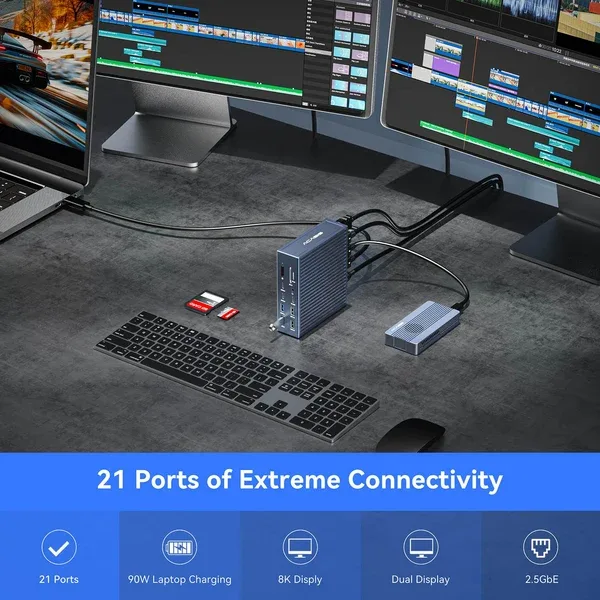
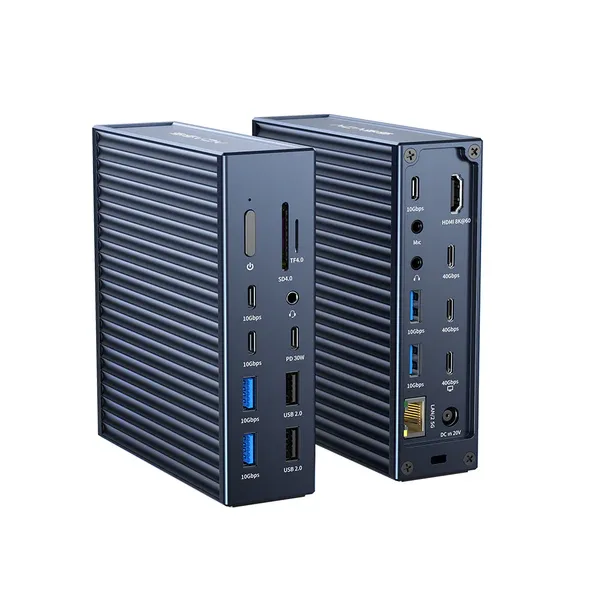
ACASIS offers everything from compact five-, six-, and eight-in-one USB-C hubs to more advanced desktop docks. Its current catalog includes a 21-port 40Gbps Thunderbolt 4 docking station as well as 15-in-1 and other multi-interface models.
Depending on the specific model, connections can include HDMI, USB-A, USB-C, Ethernet, memory-card readers, audio, power delivery, and other interfaces. Because port selection varies between models, buyers should compare the exact configuration with the devices they actually use.
Solutions for Mac mini Users
Another interesting part of the ACASIS range is its selection of docks designed around Apple’s Mac mini. The company offers Mac mini M4 workstation and dock products that combine additional connectivity with SSD storage expansion.
This type of accessory can be especially useful because it allows users to organize several functions around one compact desktop platform. Instead of connecting separate storage enclosures, card readers, and USB adapters, a purpose-designed dock can consolidate multiple connections.
ACASIS currently offers Mac mini M4 products including an 8-in-1 40Gbps workstation dock, dual-bay SSD solutions, and dock-and-stand configurations with M.2 NVMe enclosure functionality.
For photographers and content creators using a Mac mini as their primary workstation, the ability to combine additional ports and external NVMe storage in a coordinated desktop setup can be particularly attractive.

Who Should Consider ACASIS?
ACASIS products are especially relevant for users who frequently work with external storage or need more connectivity than their computer provides.
Content creators can benefit from fast NVMe storage for transferring and organizing large video and photography libraries.
MacBook and laptop users can use ACASIS docking stations to expand a limited number of built-in ports and create a more practical desktop workspace.
Mac mini users can explore dedicated docks that integrate storage expansion with additional connectivity.
Business users who regularly move large datasets between computers may appreciate the combination of portability and high-bandwidth storage.
Technology enthusiasts who already own compatible M.2 NVMe drives can use an enclosure to turn those drives into external storage rather than leaving them unused.
What to Check Before Buying
The most important step before purchasing an ACASIS product is checking compatibility carefully. Thunderbolt, USB4, USB-C, and USB 3.x ports can look physically similar while supporting very different capabilities.
For example, some high-performance ACASIS enclosures are intended specifically for Thunderbolt and USB4 hosts. Connecting high-speed hardware to an unsupported or slower interface may result in reduced functionality or no compatibility at all.
You should therefore verify your computer’s exact port specification, operating system, SSD format, supported M.2 size, and the requirements of the individual ACASIS model before ordering.
For SSD enclosures, remember that the SSD itself may need to be purchased separately unless the product listing explicitly states otherwise.
ACASIS Review: Final Verdict
ACASIS has built an interesting product ecosystem around two increasingly important requirements: fast external storage and expanded computer connectivity.
Its 40Gbps M.2 NVMe enclosures are particularly appealing for users who want to build portable storage around their choice of compatible SSD. Tool-free designs, compact aluminum construction, Thunderbolt connectivity, and multiple enclosure configurations make the range flexible enough for both everyday and professional applications.
The larger ACASIS catalog extends that concept further with dual-drive RAID enclosures, multi-port Thunderbolt docking stations, USB-C hubs, and Mac mini expansion solutions. This gives users the ability to build a workstation around storage and connectivity products from the same ecosystem.
No accessory is ideal for every computer, so compatibility remains the key consideration. But if your system supports the required interface and you regularly work with large files, external NVMe storage, multiple displays, or numerous peripherals, ACASIS provides several compelling options worth comparing.
For photographers, video editors, designers, business users, and technology enthusiasts in particular, ACASIS offers a practical combination of performance-oriented storage and versatile connectivity.
Discover ACASIS SSD enclosures, Thunderbolt docking stations, USB-C hubs and high-speed storage solutions.




Reviews
There are no reviews yet.