
 Electronics & Computer
 Smart Home & Security
 Home Appliances
 Kitchen & Dining
 Power & Charging
 Gaming & Entertainment
 Automotive & Outdoor
 Health & Personal Care
 Office Electronics
 Smart Lighting & Ambient


🤝 AFFILIATE DISCLOSURE: AVERY FINDS MAY EARN A COMMISSION IF YOU PURCHASE THROUGH LINKS IN THIS ARTICLE.
Choosing a virtual private server for WordPress or WooCommerce starts with measuring what happens on a busy day. A store might serve checkout requests while importing products, resizing images, and processing scheduled jobs. A blog with a similar number of visitors might serve mostly cached pages. Those workloads can call for different amounts of memory, storage, and processing power.
This BandwagonHost Los Angeles DC9 review compares four E-Commerce VPS configurations using the provider’s published catalog. It explains what you get at each size and which measurements can help you decide whether the extra capacity is worth paying for. The illustrations summarize the listed specifications. Every image and button opens the same Los Angeles DC9 order page, where you can select a configuration and billing period.
What Is BandwagonHost Los Angeles DC9?
BandwagonHost offers self-managed virtual private servers using KVM virtualization. The order page identifies Los Angeles DC9 as USCA_9 at CoreSite LA2. BandwagonHost highlights AMD EPYC hardware and NVMe RAID-10 storage for this location. If server location is part of your decision, consider where your visitors are and how your site performs for them. An advertised port speed is only one part of that comparison.
The service includes the KiwiVM control panel. After activation, you can choose an available operating system through KiwiVM. The panel also provides controls for starting or stopping the VPS, checking usage, accessing an emergency console, and taking snapshots. You or your administrator handles WordPress, WooCommerce, the database, software updates, and recovery. Include that work when comparing this service with your current host.
1. BandwagonHost DC9 40 GB VPS
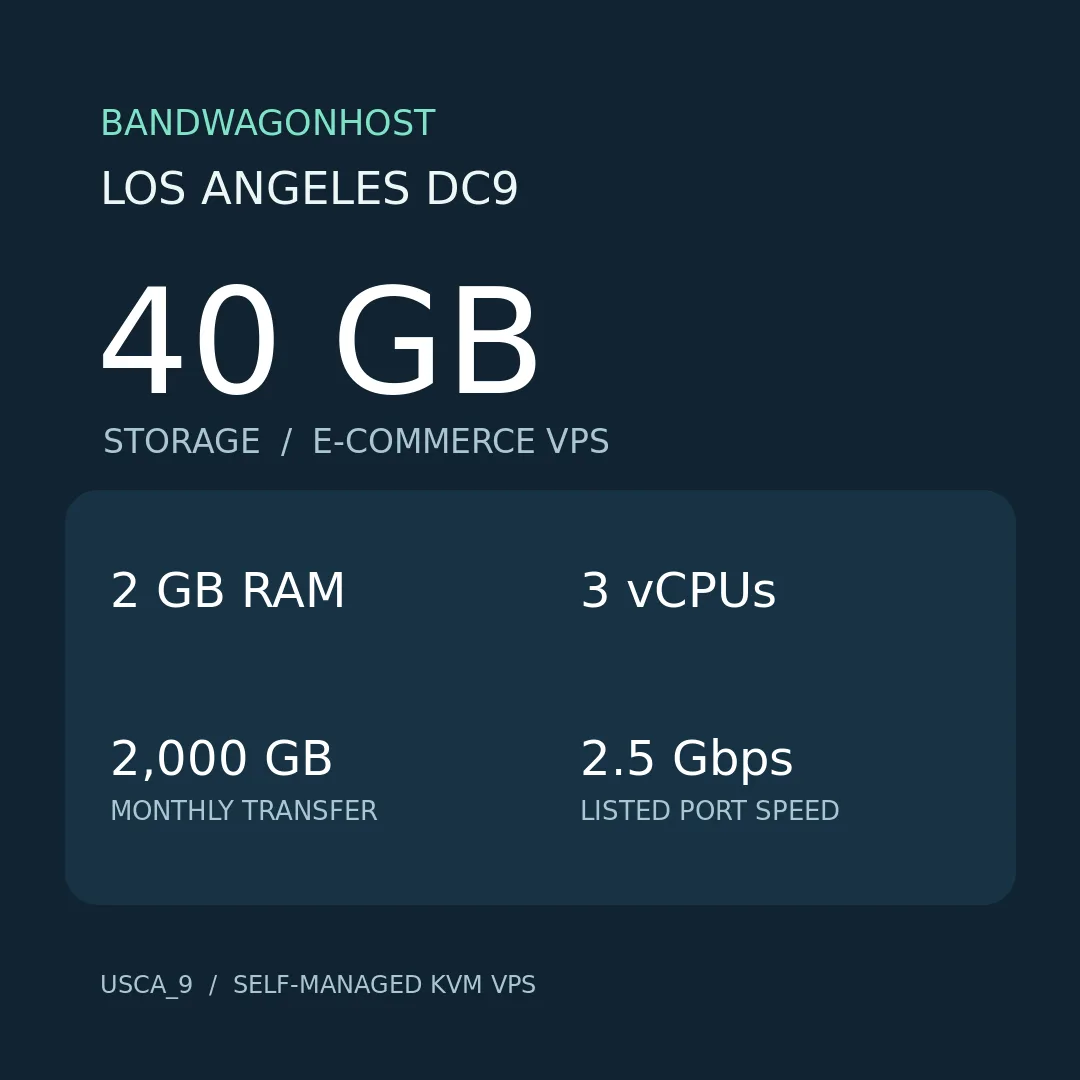
The 40 GB configuration lists 2 GB of RAM, 3 vCPUs, 2,000 GB of monthly transfer, and a 2.5 Gbps port. It is the smallest option in this comparison. Start here if you are evaluating a development site, a lightweight WordPress blog, or a small application with predictable resource use.
Check memory while the web server, PHP workers, and database are active together. Even a quiet website may use more memory during a backup, image import, or software update. If you already operate the site, look at peak usage during one of those tasks as well as during normal browsing. That gives you a better sense of how much room the server has when several jobs overlap.
For storage, count the operating system, website files, uploads, logs, and database. A migration can briefly need space for both a compressed archive and the files you restore from it. If the website is new, estimate how quickly its media library might grow and allow space for updates. Check the billing periods offered for this configuration before comparing the total with a larger plan.
2. BandwagonHost DC9 80 GB VPS
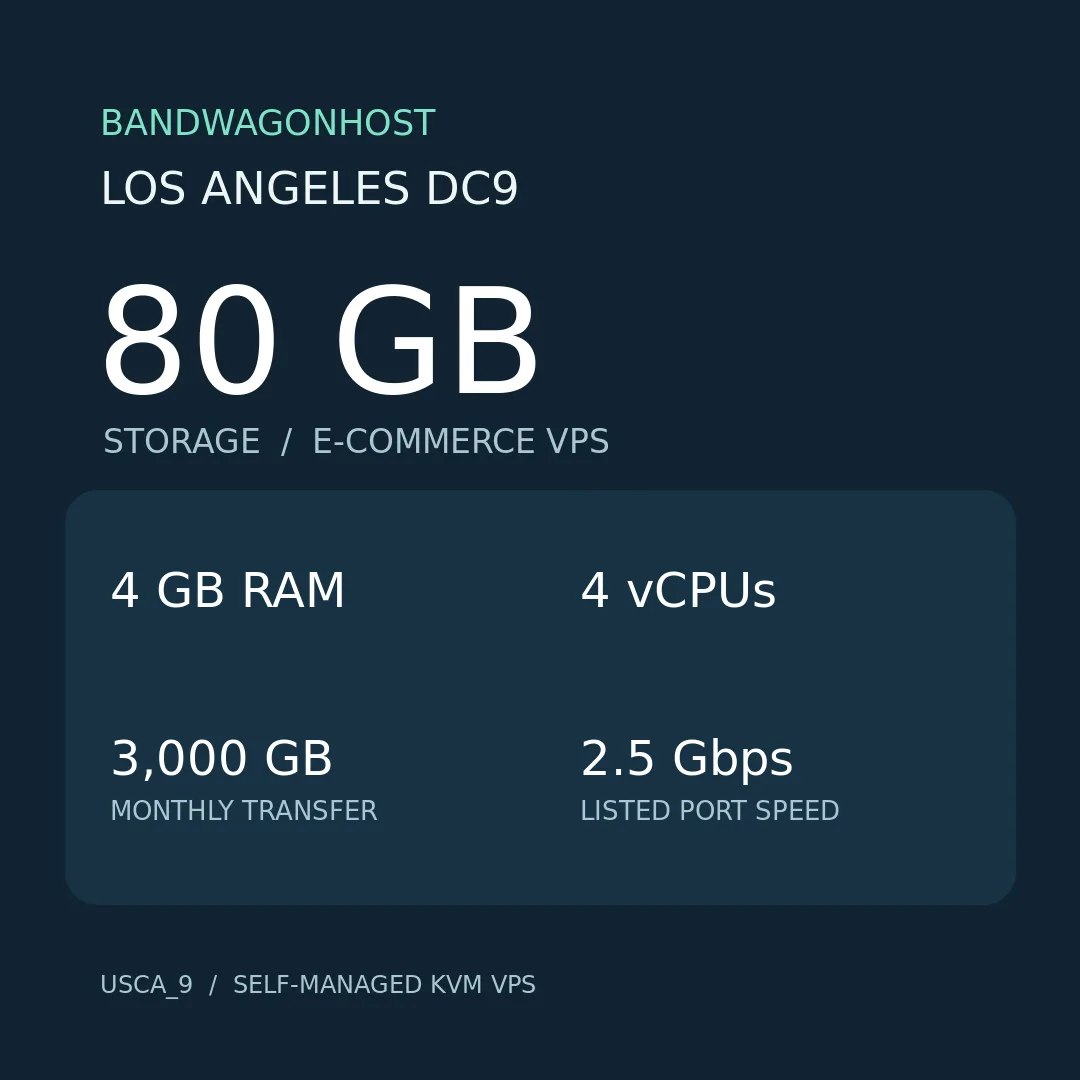
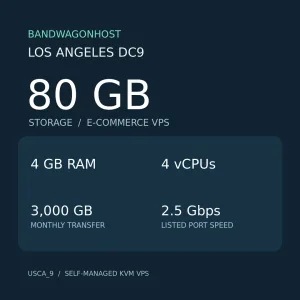
The 80 GB option lists 4 GB of RAM, 4 vCPUs, 3,000 GB of monthly transfer, and a 2.5 Gbps port. It doubles storage and memory compared with the 40 GB option. That extra capacity is worth evaluating if your site has a growing media library or your store runs its database and background jobs on the same server.
For WooCommerce, include checkout, customer accounts, product search, and the administration screens in your comparison. A cached product page can feel responsive while a stock update or an import puts more pressure on the database. If your current host provides usage charts, compare the peaks with the times those jobs run. A spike during a predictable task is more useful for sizing than a daily average.
Use a staging copy if you can. Run a representative product import while another session browses a few pages or tests checkout. Watch memory and disk use during the test. If disk space is the main reason for upgrading, check how much of your storage comes from uploads, backups, or logs. Each grows at a different rate, and the breakdown can help you estimate how long the 80 GB allocation will last.
3. BandwagonHost DC9 160 GB VPS
The 160 GB plan lists 8 GB of RAM, 6 vCPUs, 5,000 GB of monthly transfer, and a 5 Gbps port. It is worth comparing when the application, database, and background workers need more room to operate together. The additional disk space can also help if you keep a staging copy alongside the primary site and have measured what the two environments use.
If slowing checkout prompted the upgrade, check where the time goes. Memory pressure during a scheduled import is a reason to evaluate a larger allocation. A slow query or a delay from a payment service calls for a closer look at that part of the application. Knowing the bottleneck lets you compare a larger VPS against a specific problem and check whether your changes address it.
Before moving live traffic, test the cart, payment flow, transactional emails, order status updates, and inventory changes on the new setup. If the store relies on scheduled tasks, verify that those tasks run at the expected times. Check both the response customers see and the work the store performs after an order is placed.
4. BandwagonHost DC9 320 GB VPS
The 320 GB configuration lists 16 GB of RAM, 8 vCPUs, 8,000 GB of monthly transfer, and a 5 Gbps port. It offers the most storage, memory, and transfer of the four configurations reviewed. Compare it if your site has a substantial local media library or you run several applications with resource needs you have already measured.
Hosting several projects together reduces the number of servers you administer. It also means one restart can affect multiple sites. Check whether their busiest tasks overlap. Two stores might process imports in the same hour, for example, while separate backup jobs write to the same disk. Plan how you would restore each website and database individually, and keep backup copies somewhere you can access independently of the VPS.
If storage growth is driving the decision, calculate how much space you currently use and how quickly you add files. A store that frequently adds high-resolution product photos may grow differently from a site storing most of its media elsewhere. Compare that estimate with the billing total to decide when the extra capacity would become useful.
What to Check Before Ordering
- Tier and location. Confirm E-Commerce VPS and Los Angeles USCA_9 on the order page. BandwagonHost lists multiple tiers and Los Angeles datacenters.
- Billing period and availability. Check the amount due for your entire selected billing period and verify availability at checkout.
- Storage and memory. Measure normal use and peak use during imports, updates, and backups. Allow space for temporary files and growth.
- Monthly transfer. Compare the allowance with expected traffic and outbound file delivery. The port speed describes the network connection.
- Ongoing administration. Decide who will maintain WordPress, monitor the VPS, and restore the site if needed.
Frequently Asked Questions
Does E-Commerce VPS come with WooCommerce installed?
E-Commerce VPS is BandwagonHost’s hosting tier name. The server is self-managed, so you or your administrator handles WordPress installation, WooCommerce setup, and ongoing maintenance.
What can I do in KiwiVM?
BandwagonHost lists operating system selection, start and stop controls, emergency console access, usage statistics, and snapshots among the panel’s features.
Does a 5 Gbps port guarantee faster checkout?
Checkout speed also depends on database queries, plugins, payment requests, and the shopper’s connection. Test the complete checkout flow on your setup to judge its performance.
Conclusion
BandwagonHost Los Angeles DC9 is worth comparing if you want a self-managed VPS at this location and have someone to maintain the software. Evaluate the 40 GB or 80 GB options for a lean workload. Compare the 160 GB or 320 GB options when your measured memory, storage, or transfer needs justify more capacity. Once you have a configuration in mind, check the location, availability, and billing total on the USCA_9 order page.





Reviews
There are no reviews yet.