
 Electronics & Computer
 Smart Home & Security
 Home Appliances
 Kitchen & Dining
 Power & Charging
 Gaming & Entertainment
 Automotive & Outdoor
 Health & Personal Care
 Office Electronics
 Smart Lighting & Ambient





🤝 AFFILIATE DISCLOSURE: AVERY FINDS MAY EARN A COMMISSION IF YOU PURCHASE THROUGH LINKS IN THIS ARTICLE.
Choosing an AI video platform starts with knowing what you need to make. A product marketer might want three versions of an ad from the same product photo. A filmmaker might need more control over camera movement. A designer might only need a strong still image to set the direction for a campaign. Higgsfield brings these jobs into one platform, with a different tool for each stage of production.
This Higgsfield AI review compares Cinema Studio, Marketing Studio, Soul Cinema, and Canvas using the company’s published documentation and examples. For each tool, we look at what you start with, what you can make, and what to check before committing to a subscription. The images show Higgsfield’s own examples or interface. All images and buttons lead to the Higgsfield homepage, where you can navigate to the tool you want to explore.
What Is Higgsfield AI?
Higgsfield is an AI creative platform for generating images and video, planning scenes, and building reusable production workflows. Its tools cover several distinct jobs. Cinema Studio is the filmmaking workspace. Marketing Studio focuses on product videos and ad formats. Soul Cinema is an image model for cinematic stills. Canvas connects prompts, references, and generation tools on a visual board.
You can start with a single tool. For example, a brand team with an existing product photo might go straight to Marketing Studio. A creator planning a short film might first develop the look of a scene in Soul Cinema, then use that image as a reference in a video workflow. A team that repeats the same process across several campaigns may find it worthwhile to organize the steps in Canvas.
1. Cinema Studio for AI Filmmaking

Cinema Studio is the tool to explore when you want to direct how a shot looks and moves. Higgsfield documents controls for camera and lens choices, focal length, lighting, color, and camera motion. The controls you see depend on the version or mode you select. For a short branded scene, you can use those settings to plan a wide establishing shot and a closer product shot with a shared visual direction.
A practical first project is a scene with one subject and one deliberate camera move. Hold the other inputs steady while you compare the results. If you change the prompt, movement, and image reference in the same run, it becomes harder to tell which change helped. For a sequence, use a consistent reference and check the details that matter to your project, such as clothing, props, or the direction of the light.
Cinema Studio is a good candidate when those choices are part of the creative brief. If your main goal is to make several social ad variations from a listing, Marketing Studio gives you a more direct starting point. Before running a longer scene, check the settings and credit cost shown for the mode you plan to use.
Visit Higgsfield for Cinema Studio
2. Marketing Studio for Product Videos

Marketing Studio starts with a product URL or an image and is designed for ad formats such as product showcases, UGC-style videos, unboxings, and tutorials. That gives an ecommerce team a way to draft multiple approaches to the same product. For example, one version could show the product from several angles while another explains a single feature using a short script.
Choose one message for each variation. If a customer needs to see how a closure works, focus the clip on the closure and compare it with the original photography. If the ad features a presenter, review the script, pronunciation, and on-screen wording before publishing. Packaging text, product dimensions, accessories, and colors also deserve a close look. A generated product video can introduce visual details that a shopper may interpret as features of the item.
Marketing Studio is a better fit when you already have reliable product materials and know the format you want to create. Judge the output against your approved images and copy. If the clip needs corrections, those revisions matter when you decide whether the workflow fits your publishing schedule.
Visit Higgsfield for Marketing Studio
3. Soul Cinema for Cinematic Still Images

Soul Cinema is Higgsfield’s image model for film-inspired stills. Its look is built into the model, and Higgsfield also documents support for applying a Soul HEX color palette or a Soul ID character. You can use a still to establish how a location should feel, develop a storyboard frame, or create a reference for a later image-to-video generation.
Start with a frame you can evaluate on its own. Describe the subject, framing, lighting, and a few elements that need to be present. If you plan to animate the image, think about where the subject can move and what the viewer needs to see throughout the shot. A dramatic close-up may work beautifully as a still, while a wider frame may give the video more room to show a gesture or reveal an object.
This tool is worth comparing if image direction is the part of the project you want to settle first. For product work, compare generated stills against original product photos before using them in a listing or campaign. For fictional scenes and concept development, evaluate whether the frame communicates the intended mood and gives the next stage enough information.
Visit Higgsfield for Soul Cinema
4. Canvas for Reusable AI Workflows
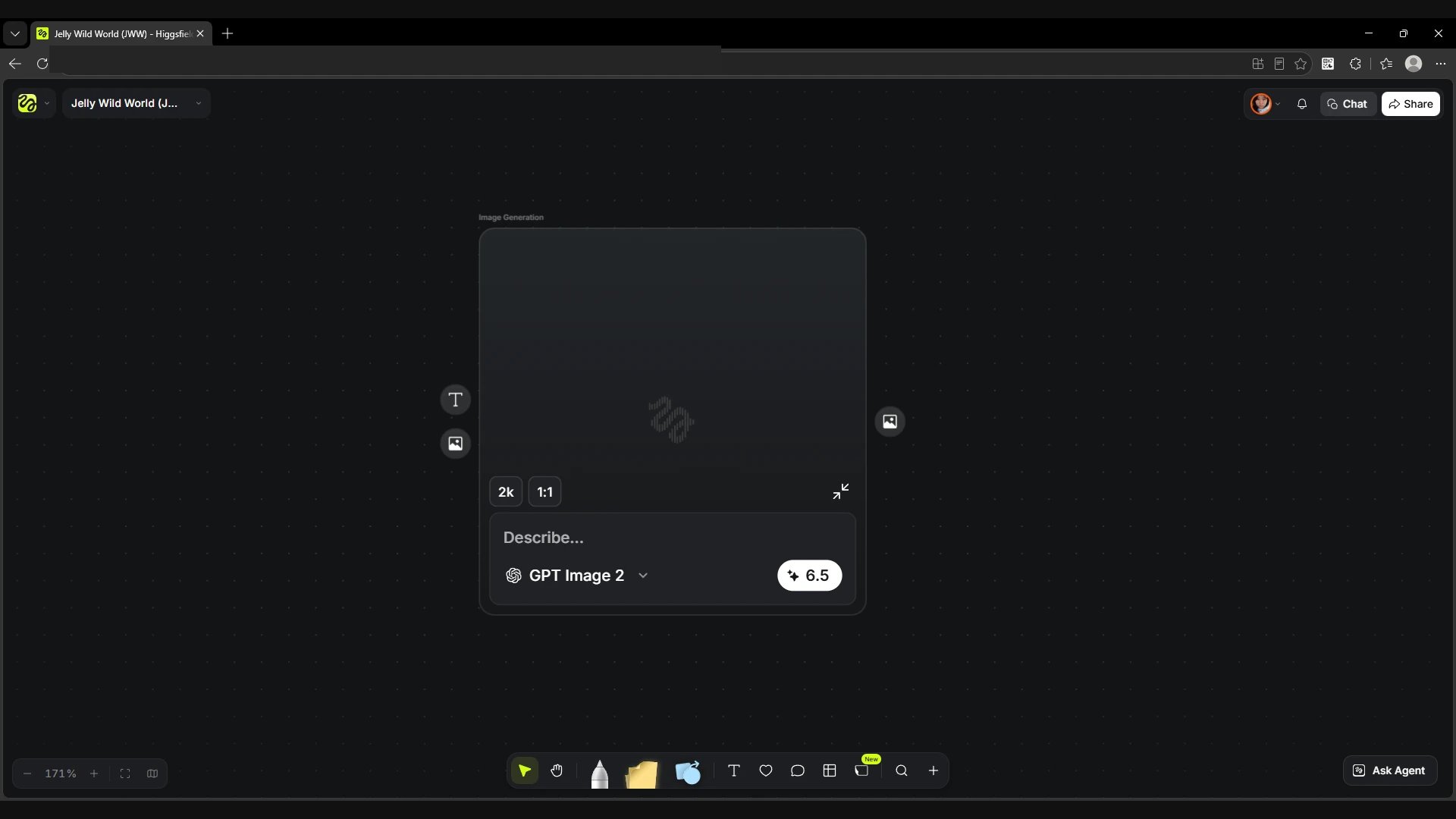
Canvas is a visual board for connecting prompts, references, and models. Each node handles a step, such as generating an image or turning an image into video. The board lets you see what feeds each stage. Higgsfield also describes running models in parallel, comparing results, and saving a workflow as a template. These features matter most when you expect to use the same sequence of steps on multiple projects.
A simple workflow could start with an approved product photo, produce two possible campaign backgrounds, and turn the selected result into a short motion clip. Keeping the branches side by side makes it easier to trace which image and prompt produced each video. If you work with a team, the board can also give reviewers a place to see which reference and generation path you used.
For a single image or a quick clip, opening the dedicated tool may take fewer steps. Canvas earns its place when a process needs to be repeated, handed to another person, or adjusted as references change. Start with a workflow you already understand and save it once you know which steps are worth reusing.
What to Check Before Choosing a Higgsfield Plan
- Model and tool access. Check that the plan includes the specific model or studio you intend to use.
- Credit use. Estimate the cost of one publishable result, including drafts, alternate versions, and revisions.
- Output settings. Confirm which aspect ratios, resolutions, clip lengths, and export options are available in your chosen workflow.
- Billing and usage terms. Check the current price, billing interval, renewal terms, and whether your planned commercial use is covered.
- Review time. Budget time to check product details, on-screen text, and continuity before publishing.
Frequently Asked Questions
Which Higgsfield tool should I start with for a product video?
Start with Marketing Studio if you have a product URL or a clean product image and want an ad format. Try Cinema Studio when the brief calls for a specific camera move, lighting setup, or shot sequence.
Can I use Soul Cinema images as video references?
Yes. Higgsfield describes Soul Cinema stills as inputs for image-to-video workflows. Check the selected video model’s reference and aspect-ratio settings before generating.
Do I need Canvas to generate a video?
You can generate through a dedicated studio. Canvas is useful when you want to connect tools, compare several outputs on one board, or reuse the same workflow.
How much does Higgsfield cost?
Check the current pricing page and the credit cost shown in the tool you plan to use. Your total usage depends on the models, settings, and number of generations you run.
Conclusion
Higgsfield is worth considering if you regularly create product videos, cinematic visuals, or campaigns with multiple versions. Start with the tool that matches your first deliverable. Pick Cinema Studio for shot direction, Marketing Studio for product ad drafts, Soul Cinema for still references, or Canvas for a workflow you expect to repeat. One small project will give you a practical basis for comparing the results, revision time, and credit use before you subscribe.






Reviews
There are no reviews yet.